
During laser class on June 11, a new weird behavior manifested in the laser lab. The first few millimeters of a cut were skipped. To be more precise, the laser fired at greatly reduced power during this short interval, and then began to fire normally. Here is a photo of a half-inch test square cut while this was happening. The job origin was at the upper left corner and motion proceeded clockwise. You can see that the power was close to normal for a very short time, then greatly reduced for a longer time, then suddenly returned to normal.

We spent a lot of class time trying to figure out what we were doing wrong to cause this problem, but we were not successful. I spent some more time after class, and still could not find any setting or any other user error that could conceivably cause this malfunction.
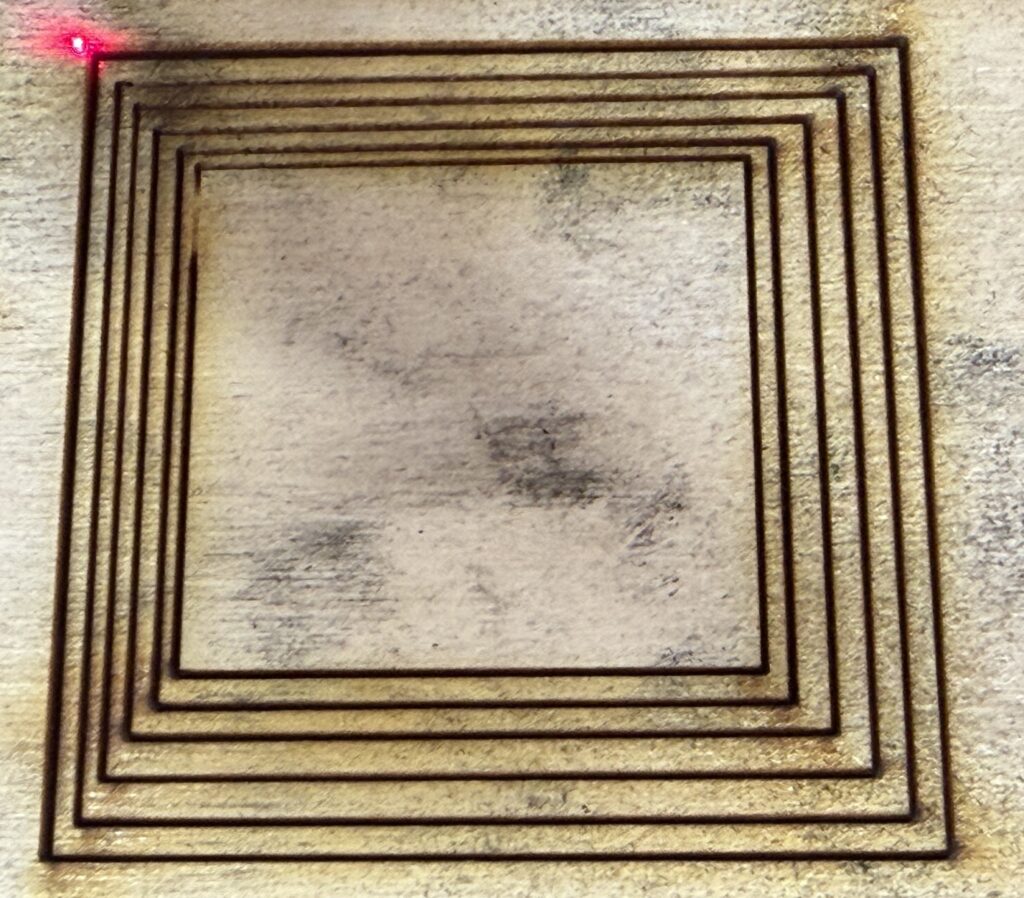
I tried to characterize it in more detail. Here’s a test where I drew a half-dozen roughly concentric squares and cut it all in one job. Recall that if you draw things inside of other things, all in the same color (“layer” in LightBurn terminology), the program automatically draws the inner ones before the outer ones. So in this case, starting from the red dot at the origin in the upper left corner, the laser first jumps to the nearest corner of the innermost square. Then it chooses a direction somehow, apparently choosing counterclockwise in this case. So, you can see the defect at the top of the left side of the innermost square. The other squares do not show the defect. Each square is a separate cut in that the laser beam turns off and the laser head moves before it turns on again, but the gap between the squares is small. Apparently whatever effect is responsible for the beam working after the initial outage persists between separate cuts, if they are close together.
Here’s a similar test, except that it’s a Fill (raster) layer instead of a Line (vector) layer. The outage appears larger because the linear speed is higher. LightBurn starts at the bottom of Fill layers by default, so the outage appears on the bottom line.

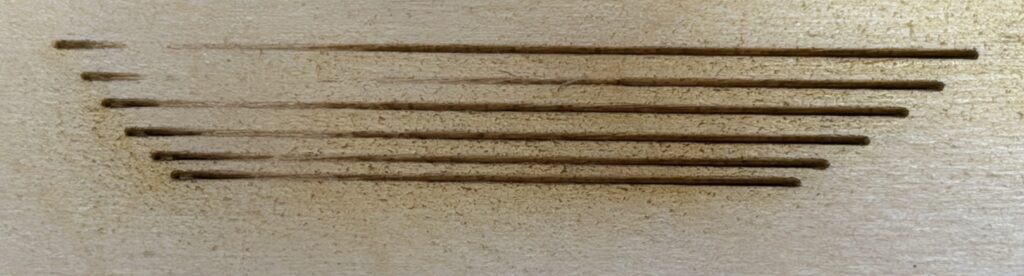
Here’s a variation on the above test. This time it’s a Line (vector) layer again, in fact the drawing is the same file as the nested squares. I broke apart the squares into four lines each, and selected only the top line, using the “Cut Selected Graphics” option to disregard the rest. Then I manually selected the next top line and ran the job again, and so on. In this way I was able to vary the delay between cuts. You can see the outage on all the lines, but the length and strength of the outage varies. I didn’t record the delays, but toward the end of the experiment I was getting better at restarting the job quickly. You can see that a quick restart meant a shorter and weaker outage.
This was starting to feel like some kind of hardware issue, not a logical software or digital issue at all. Thermal, probably, or maybe capacitive. Some process with a long memory and independent of the intended job. I suspected the high voltage power supply, or maybe the laser tube itself, but probably the power supply. I went ahead and ordered a replacement power supply, in case that turned out to be the problem.
Due to other obligations, I was not able to work on this problem before the next scheduled laser class, on June 15. Rather than cancel the class due to the laser malfunction, I decided to go ahead with it and challenge the students to design their jobs to include workarounds for the malfunction. This worked out quite well, I think. Students were flexible and creative in coming up with workarounds for this problem.
Here’s a simple way to cut a half-inch square, with a workaround in the form of a lead-in line. The outage occurs within the lead-in line and the laser operates normally on all the sides of the square. It does tend to waste some material.

To make this work on more complicated designs, you have to understand how LightBurn decides the cut order. If you guess wrong, LightBurn might cut some other segment first, or even schedule a long traverse with the laser off or at very low power, which might cause the outage to recur.
Here’s another way that might save some material.

Maybe Lightburn would choose the isolated segment on the left to start with, and then cut the square in one motion. Maybe not! You can run Preview to find out.
Spoiler: I was right to suspect the power supply. The next article will tell the tale.